> For the complete documentation index, see [llms.txt](https://docs.lightact.com/llms.txt). Markdown versions of documentation pages are available by appending `.md` to page URLs; this page is available as [Markdown](https://docs.lightact.com/layers-and-layouts/stock-layer-templates/generative-layer-templates/solid-color.md).
# Solid Color
Category: Generative
**Solid color** is one of the generative layer templates that creates a solid color useful for various testing purposes.
## Variables
### **Render**
Explained in [Stock Layer Templates](/layers-and-layouts/stock-layer-templates.md).
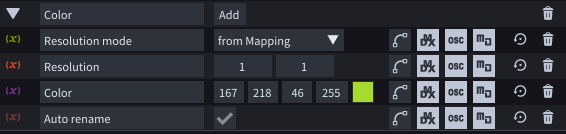
### **Solid color**
* **Resolution mode**: select if you want the resolution of the color grid to adapt to the resolution of the mapping or would you like to use a custom resolution.
* **Resolution**: if Resolution mode is set to Custom then this would be the resolution of the texture.
* **Color**: color of the layer
* **Auto rename:** select if you want the layer's name to display the state of the variables.