> For the complete documentation index, see [llms.txt](https://docs.lightact.com/llms.txt). Markdown versions of documentation pages are available by appending `.md` to page URLs; this page is available as [Markdown](https://docs.lightact.com/integrations/network/tcp-and-udp.md).
# TCP & UDP
In this page, we will go through sending and receiving TCP & UDP
Setting up sending and receiving UDP and TCP is basically the same, so in this document, we will go through the steps required to send or receive UDP messages.
## Receiving UDP
### Setup in the Devices window
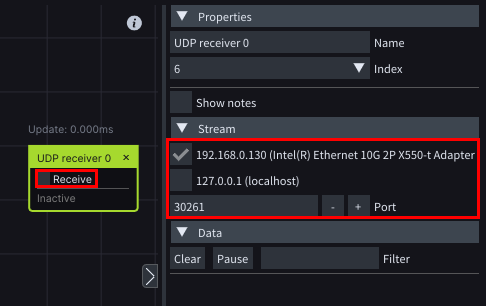
Insert a **UDP Receiver** node and after you set *Stream* parameters check the **Receive** checkbox.
{% hint style="info" %}
**Good to know**: for TCP you need to insert a **TCP Receiver** node.
{% endhint %}
### Setup in the Layouts window
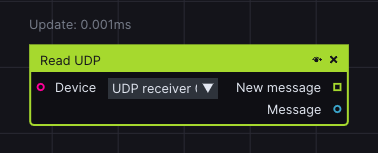
Insert a **Read UDP** node, choose the device in **Device** input.
{% hint style="info" %}
**Good to know**: for TCP you need to insert a **Read TCP** node
{% endhint %}
## Sending UDP
### Setup in the Devices window
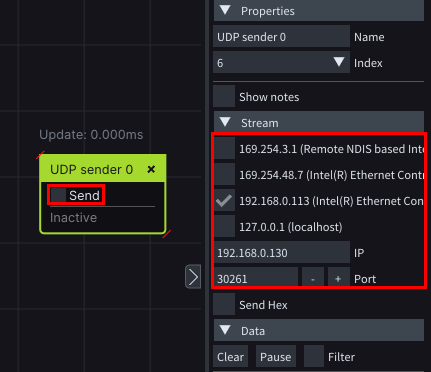
Insert a **UDP Sender** node and after you set *Stream* parameters check the **Send** checkbox.
{% hint style="info" %}
**Good to know**: for TCP you need to insert a **TCP Sender** node
{% endhint %}
### Setup in the Layouts window
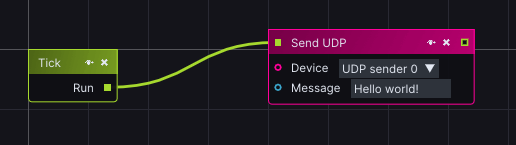
Insert a **Send** **UDP** node, choose the device in **Device** input and set the **Message** which will be sent.
{% hint style="info" %}
**Good to know**: for TCP you need to insert a **Send TCP** node
{% endhint %}