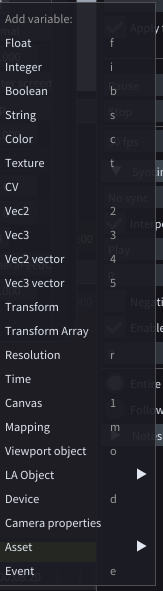
| Float | Number with a decimal point | 1.6314 |
| Integer | Whole number | 5 |
| Boolean | True or false (represented as a checkbox) | True |
| String | Text | Hello world! |
| Color | RGBA representation of color where 0 is 0 and 1 is full | [1.0,1.0,1.0,1.0] (white) |
| Texture | A pointer to a texture in the VRAM of the GPU |  |
| OpenCV | An image for computer vision processing |  |
| Vec2 | A vector of 2 floats | [1.231, 10.231] |
| Vec3 | A vector of 3 floats | [543.12,-1.231,5.000] |
| Vec2 array | An array of Vec2 | NA |
| Vec3 array | An array of Vec2 | NA |
| Transform | A vector of: Vec3 representing Position, Vec3 representing Rotation, Vec3 representing Scale | NA |
| Transform array | An array of transforms | NA |
| Resolution | A vector of 2 integers representing resolution | [1920,1080] |
| Timecode | A HMSF representation of time | [00:02:12:32] |
| Canvas | A reference to a canvas (obsolete) | NA |
| Mapping | A reference to a mapping | NA |
| Viewport object | A reference to a viewport object | NA |
| LA Object | A reference to all kinds of objects in LightAct: Timeline, Section, Layer, Marker, Video output | NA |
| Device | A reference to a Device node | NA |
| Camera properties | An array of values representing properties of a camera: Position, Rotation, FOV, Aspect ratio, Near clip, Far clip | NA |
| Asset | A reference to an Asset. There are several types: Video, 3D model, Audio, Notch block, Unreal, TouchDesigner component | NA |
| Event | A Lifeline type | NA |