> For the complete documentation index, see [llms.txt](https://docs.lightact.com/llms.txt). Markdown versions of documentation pages are available by appending `.md` to page URLs; this page is available as [Markdown](https://docs.lightact.com/quick-start/general-troubleshooting.md).
# General troubleshooting
There are several troubleshooting pages spread across these user docs related to specific features. On this page, however, you will find more general troubleshooting advice.
{% hint style="info" %}
**Good to know:** please also have a look at the [system requirements](https://docs.lightact.com/preparing-your-hardware-for-lightact/getting-your-hardware-ready-to-run-lightact).
{% endhint %}
{% hint style="warning" %}
Project files shouldn't be saved in Google Drive or Dropbox folders or folders of similar services (see below).
{% endhint %}
LightAct's GUI is black upon launching
Most likely reason is that the GPU LightAct is running on is not a suitable one. Please make sure that you are using a discrete Nvidia GPU and that you've set up your laptop as per [this tutorial](https://youtu.be/siP-Rpj8S4E).
LightAct closes upon launch - cache
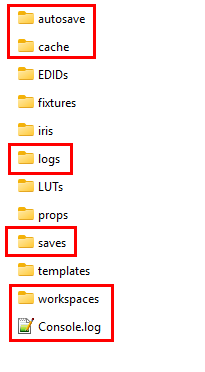
One possible step would be to go into *C:\ProgramData\LightAct\LightAct4* folder and delete these files and folders:
If LightAct still doesn't launch correctly, try to:
1. uninstall LightAct completely, including the *Preferences*,
2. install it again.
In every case, please **contact us at ** and let us know what you find out.
LightAct closes upon launch - DirectShow
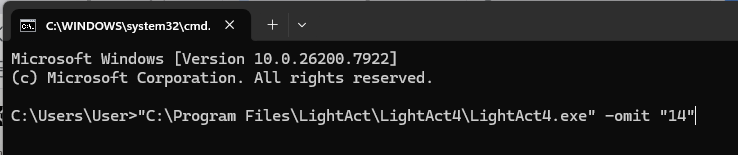
If LightAct closes upon launch and you are using either 4.12 or 4.13 version, please try launching LightAct with -omit "14" launch argument. This will prevent DirectShow module from loading.
You should therefore open CommandPrompt window:
and type in:
```
"C:\Program Files\LightAct\LightAct4\LightAct4.exe" -omit "14"
```
Please note, this command assumes that LightAct is installed in *"C:\Program Files\LightAct\LightAct4\\".* If you installed LightAct in a different location, you should modify the command accordingly.
Also, this means you will not be able to use DirectShow Receiver node in the Devices window.
LightAct 'keeps crashing' or acts weirdly
One reason for this might be that you have your project files in a Google Drive or Dropbox or a similar service. These programs interfere with file access which might cause LightAct to behave in a weird way.