> For the complete documentation index, see [llms.txt](https://docs.lightact.com/llms.txt). Markdown versions of documentation pages are available by appending `.md` to page URLs; this page is available as [Markdown](https://docs.lightact.com/osc-and-midi/midi.md).
# MIDI
MIDI is an asynchronous serial data protocol that is commonly used in live events.
## Receiving MIDI
### Setup in the Devices window
Insert a **MIDI receirver** node and after you have selected a *Stream* income source, you can enable the **Receive** checkbox.
### Timecode
If there is any MIDI Timecode coming in, it will be displayed at the bottom of the Data section.
{% hint style="info" %}
**Good to know**: Please note you need to use **MTC Short Message** format for LightAct to be able to parse MTC.
{% endhint %}
{% hint style="info" %}
**Good to know**: in the properties of MIDI Receiver node, you can also apply Timecode offset, which will affect all subsequent operations with this timecode.
{% endhint %}
### Setup in the Layouts window
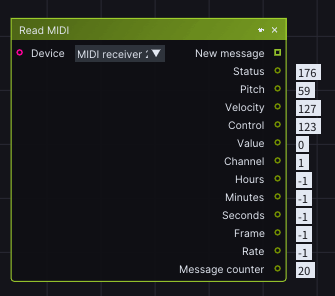
Place a **Read MIDI** node and select the **MIDI** **receiver** device node whose data you would like to read.
{% hint style="info" %}
**Good to know**: In order to watch the output values, you can right-click on the output pins and select **Watch**.
{% endhint %}
### Controlling Layers with MIDI
Similarly to [OSC](/osc-and-midi/receiving-osc/oscin.md), it is possible to control layers with MIDI. You can do that through MIDI In window where if you click on **Regenerate** button, every layer variable that has MIDI flag enabled, will get a unique MIDI Control and Value combination. If the corresponding MIDI message comes in, this variable will be set.
## Sending MIDI
### Setup in the Devices window
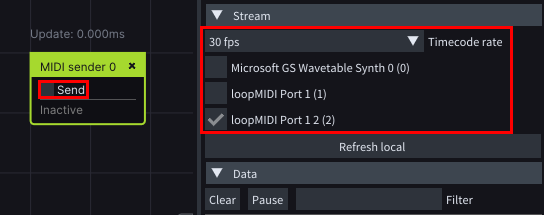
Place a **MIDI Sender** node in the *Device* window. After choosing your *Stream* parameters, such as the *Timecode rate* and Stream output, you can enable the **Send** checkbox to activate the node.
### Setup in the Layouts window
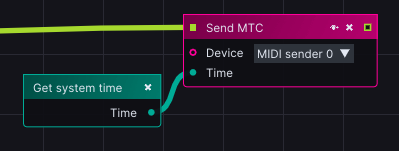
Place a **Send Mtc** node and as an input, select the newly created **MIDI sender** device node.