> For the complete documentation index, see [llms.txt](https://docs.lightact.com/llms.txt). Markdown versions of documentation pages are available by appending `.md` to page URLs; this page is available as [Markdown](https://docs.lightact.com/osc-and-midi/receiving-osc.md).
# Receiving OSC
## Receiving OSC
OSC receiver can receive different types of values (e.g. integer, float, string) on a specific OSC message address.
### Setup in the Devices window
Insert an **OSC Receiver** node and after you set *Stream* parameters check the **Receive** checkbox.
### Setup in the Layouts window
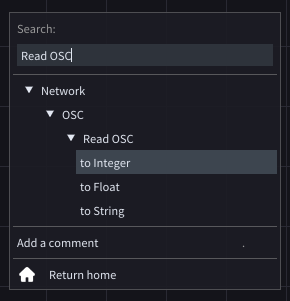
In the *Search* menu type **Read OSC** and choose the type of data you are receiving.
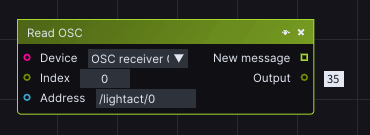
In the *Read OSC* node, choose the device in **Device** input, enter the OSC address In the **Address** string input and you are ready to receive data that is being sent to that address.
Since OSC protocol allows multiple values to be sent to the same OSC address, there is the **Index** input. This index is the index in the array of values that have been received in a bundle. We will explain how to send these bundle messages at the end of the next paragraph *Sending OSC.*