> For the complete documentation index, see [llms.txt](https://docs.lightact.com/llms.txt). Markdown versions of documentation pages are available by appending `.md` to page URLs; this page is available as [Markdown](https://docs.lightact.com/osc-and-midi/sending-osc.md).
# Sending OSC
OSC stands for open sound protocol and is often used in live-event and broadcast industries to transmit various values in high framerates.
## Sending OSC
OSC sender can send different types of values (e.g. integer, float, string) to specific OSC message addresses.
### Setup in the Devices window
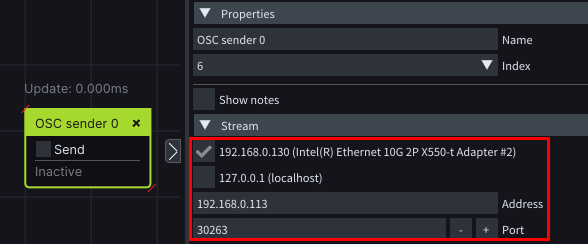
Insert a **OSC Sender** node and after you set *Stream* parameters check the **Send** checkbox.
### Setup in the Layouts window
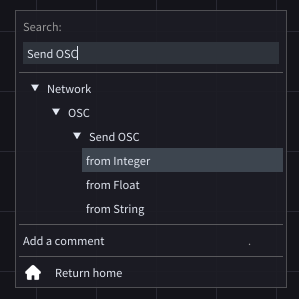
In the *Search* menu type **Send** **OSC** and choose which data type of data you would like to send.
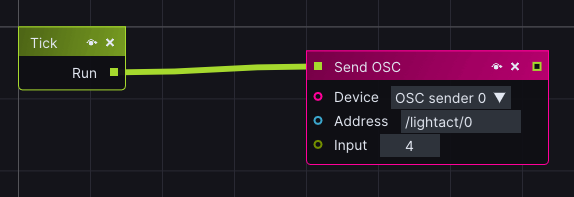
In the *Send OSC* node, choose the device in **Device** input, enter the OSC address in the **Address** string input and you are ready to send data to that address.
### Bundle messages
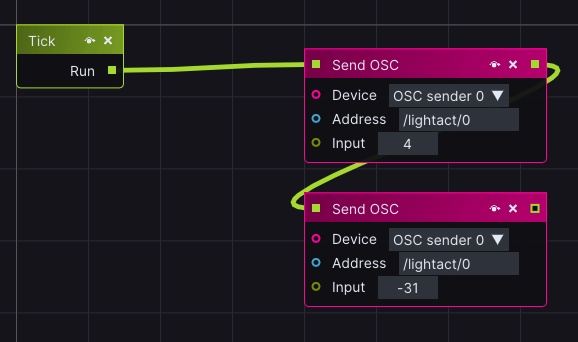
LightAct offers the option to send multiple values in a bundle message. This means that you can send multiple values to the same address by using only 1 **OSC Sender** device. For this option, we need to create multiple **Send OSC** layer nodes and connect them via **Lifeline** input/output.
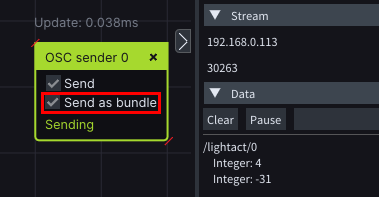
In order to enable sending a bundle check **Send as bundle** checkbox.
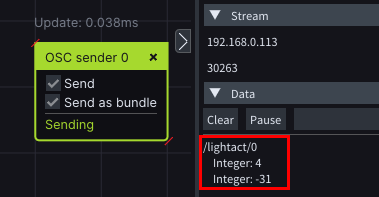
The received message will look like this:
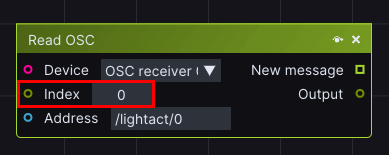
This is very useful because we can pack multiple values in a single message and extract them via an index in a **Read OSC** layer node like this: