> For the complete documentation index, see [llms.txt](https://docs.lightact.com/llms.txt). Markdown versions of documentation pages are available by appending `.md` to page URLs; this page is available as [Markdown](https://docs.lightact.com/video-playback/proxy-video-files.md).
# Proxy video files
In [LightNet ](/lightnet/lightnet-overview.md)configurations, it is desirable that the Primary and Editor servers playback files even when these files will not be actually displayed from these servers. That's because on these machines the users usually want to see all the content in the Viewport.
However, if all Primary and Editor servers tried to play all these video assets in full resolutions, the performance load would be too heavy. That's why we developed **Proxy video file feature**.
### Proxy video file naming
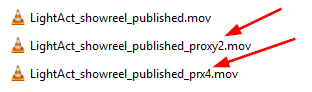
If a Video asset has **\_proxyN** or **\_prxN** in its name, LightAct knows it is a proxy file downscaled by a factor of N. This means the *Play Video* node before it passes the frame onwards, upscales it by the factor of N.
In the above image, for example, LightAct knows that:
* the original file is called *LightAct\_showreel\_published.mov*
* there is a proxy downscaled by 2, which, if it were played, is going to be upscaled by factor of 2
* and a proxy downscaled by 4, which, when played, is going to be upscaled by factor of 4.
The proxy status of a specific video asset is visible in its *Properties*.
{% hint style="info" %}
**Good to know**: How LightAct determines which server in a LightNet cluster should play the source, which server should play a proxy and which server shouldn't play a particular video asset at all is explained in [LightNet](/lightnet/lightnet-overview.md) chapter (specifically [here](https://docs.lightact.com/lightnet/server-workload-distribution#run-on-for-layers)).
{% endhint %}
{% hint style="info" %}
**Good to know**: if a server determines that it should be playing a proxy file and not the original one, it will always take the one that's been downscaled the most.
For example, if there are both \_proxy2 and \_proxy4 available, LightAct is going to play *\_*proxy4.
{% endhint %}