> For the complete documentation index, see [llms.txt](https://docs.lightact.com/llms.txt). Markdown versions of documentation pages are available by appending `.md` to page URLs; this page is available as [Markdown](https://docs.lightact.com/layers-and-layouts/layer-layouts/variables/global-variables.md).
# Global variables
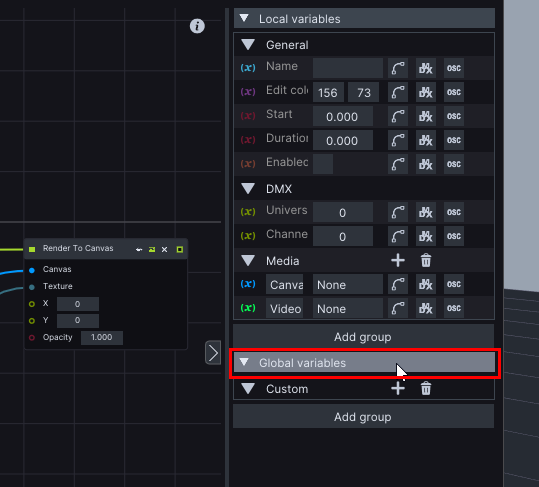
We can access and manage *Global variables* collapsible from every **Layer Layout** window.
Alternatively, Global variables can also be accessed from the **Global variables** window.
{% hint style="info" %}
**Good to know**: Global variables are accessible throughout the program which makes them ideal for global show control and data transfer between layers.
{% endhint %}
## Example of using Global variables
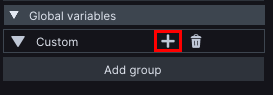
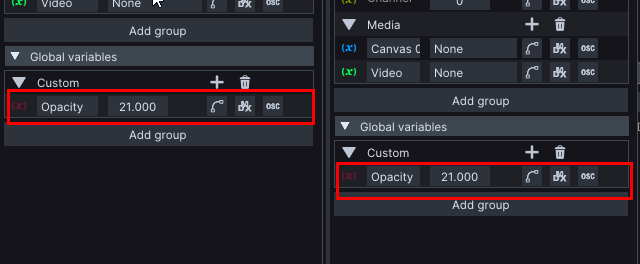
Let's say we want to control the opacity of two video layers with just one global variable we create one by pressing the + icon in the **Global variables** section.
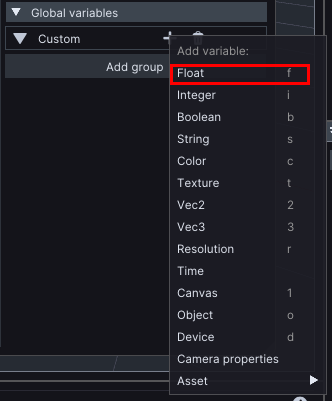
You can choose from a selection of variables. Let's choose a Float variable for this tutorial.
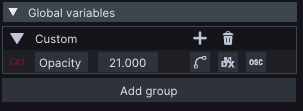
It is a good practice, to give your variables descriptive names, so let's rename it to *Opacity* and change its value.
Now when we open another video layer we can see that under **Global Variables** there is the *Opacity* float variable we created on another layer with the same values.