# LightAct 4.15.B1
{% hint style="info" %}
LightAct Changelogs are written by humans and artifical intelligence. Read more about how Changelogs are created [here](https://docs.lightact.com/release-changelogs/how-are-changelogs-generated).
{% endhint %}
This changelog was created on **12 May 2026**. It includes **7 Epics** and **32 upgrades**.
***
## Lightnet Worflow Polishing For 4.15
Enhance LightNet cluster management with easier and more versatile connection management and better performance indicators for all the machines in the cluster.
### Features
There are 2 new features in this epic.
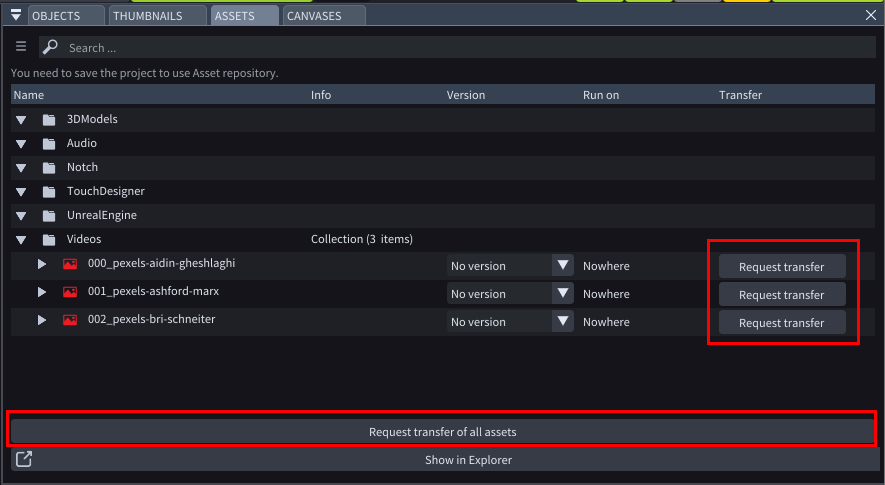
#### LA4-6843: Request Asset Transfer From Editor
Allow Editors to request asset transfer, either all of them or asset by asset.
**Status:** *Done*
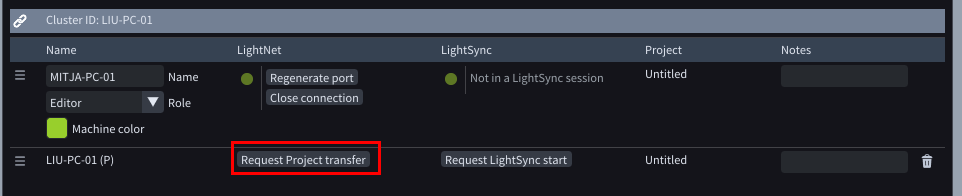
#### LA4-6451: Request Project Transfer From Editor
Added a “Request Project Transfer” button in the Primary machine section of the Editor. When pressed, the Editor sends “Requesting project transfer” to the Primary. If the editor’s “Request project transfer” permission is disabled, the Primary replies: “You don’t have permission to request project transfer.” If enabled, the Primary initiates the project transfer, targeting only the requesting Editor.
**Status:** *Done*
### Improvements
There are 9 new improvements in this epic.
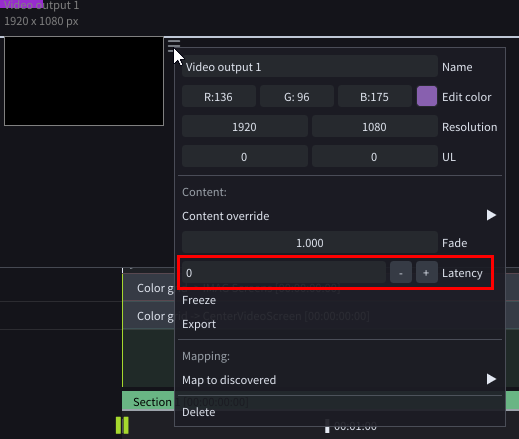
#### LA4-6853: Adding Latency On Video Outputs
Added a Latency input field on all Video outputs. It allows the user to manually add latency to individual outputs.
**Status:** *Done*
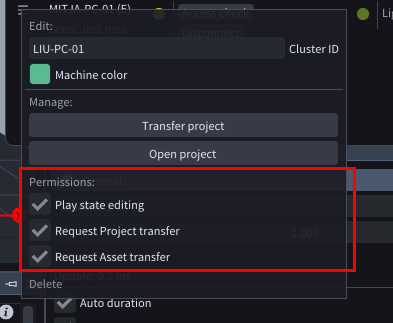
#### LA4-6842: Editor's Permissions
Added new permission controls in the Editor menu. They allow the user to finetune which permissions a specific Editor machine has.
**Status:** *Done*
#### LA4-6837: Asset's Local And Cluster Presence
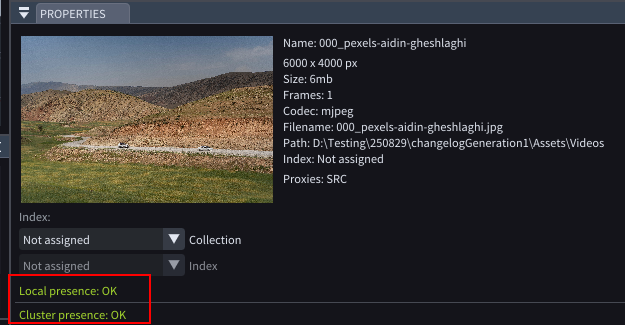
Improved Asset Presence clarity by splitting status into two labels: Local presence and Cluster presence. Local presence shows green OK when the asset exists in the local repository; otherwise the asset icon turns red/white-red with Missing. Cluster presence now depends on server role: on Primary, it’s green when the asset is present everywhere required, or red with a list of devices where it’s missing; on non-Primary, the label is disabled with “Only Primary monitors cluster presence of assets.” Tooltips mirror these states, showing “Cluster presence: NA” off-Primary.
**Status:** *Done*
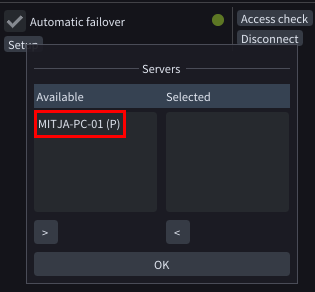
#### LA4-6833: Machine Role Mentioned In Assets Window
UI consistency: Machine role abbreviations are now shown in parentheses at this location—e.g., (P), (S), (B)—to match the rest of the application and improve clarity.
**Status:** *Done*
#### LA4-6832: Check Asset Presence Log Entries
Enhanced asset presence visibility. Clicking the Check Asset presence button now logs:- “Checking Asset presence across the cluster”- “All assets present where they should be.”- “Assets missing (check Assets window)”Manual checks display all related logs. Automatic asset presence checks surface only error and warning entries, reducing noise while preserving critical signals.
**Status:** *Done*
#### LA4-6829: Lightnet Port Management
This ticket improves LightNet’s network port management making it easier to manage LightNet connection between machines.
**Status:** *Done*
#### LA4-6823: Improved Workflows When Opening Project Files On A Different Machine
Improved workflow where you create a project on your own machine and then open it on another. Previously there were some workflows inconsistencies.
**Status:** *Done*
#### LA4-6437: Downsampling Of 3d Models
Besides native LA objects like Video screen, Thrower or projector you can now also downsample 3D Models.
**Status:** *Done*
#### LA4-6436: Iris Only On Primary
Access to the Iris window is now restricted to the Primary server. Attempting to open it on non-primary machines displays a disabled message: “Iris is available only on Primary machine.”
**Status:** *Done*
***
## Workspace And Gui Upgrades For 4.14
Enhanced Workspaces for improved usability and functionality.
### Improvements
There are 1 new improvements in this epic.
#### LA4-6901: Reset Default Workspace Button
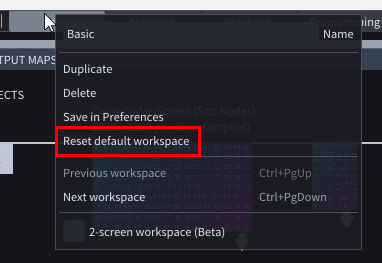
Added a contextual “Reset default workspace” option to the Workspaces menu. When the active workspace is named Basic, Mapping, or Playback, this button appears between Save and Preferences (before the separator) and restores the layout to its corresponding default configuration. This ensures quick recovery of default workspace settings.
**Status:** *Done*
***
## Workflows For Big Projects For 4.15
### Features
There are 3 new features in this epic.
#### LA4-6795: Faster Loading Of Project Files
Large project files with multiple timelines and layers now open much faster.
**Status:** *Done*
#### LA4-6794: Faster Creating Of New Layers In Large Projects
Adding new layers in timelines with lots of already existing layers is now much faster.
**Status:** *Done*
#### LA4-6793: Updating Status Label When Opening A Project File
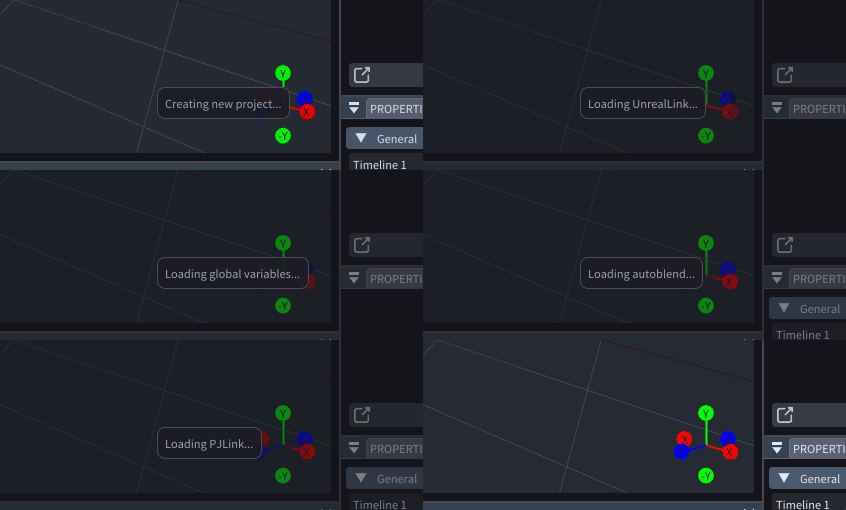
When loading a new project in LightAct, the user now gets step-by-step information on the stage of opening the project. This gives the user more information and better understanding of the opening process.
**Status:** *Done*
***
## Video Playback Improvements For 4.15
### Improvements
There are 8 new improvements in this epic.
#### LA4-6892: Clearing Buffer From Memory
Improvement of memory management when playing video files. Now the buffers get cleared more consistently after video layer is finished playing.
**Status:** *Done* | **Requesters:** *JKE*
#### LA4-6891: Preload Videos In Next Section
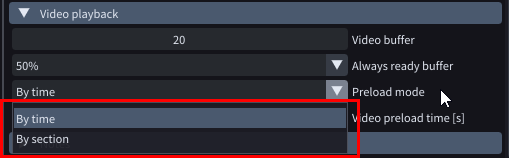
Revamped video buffering settings. Preload mode now offers two options: By time and Next section. Selecting By time shows Video preload time \[s] and retains current behavior. Choosing Next section hides the Video preload time control and automatically preloads all videos in the upcoming section.
**Status:** *Done* | **Requesters:** *JLY*
#### LA4-6875: Frameblending With 29.97 Video Files In 60fps Projects
Playback of 29.97 videos files in a 60FPS project when frameblending is on, has been improved.
**Status:** *Done*
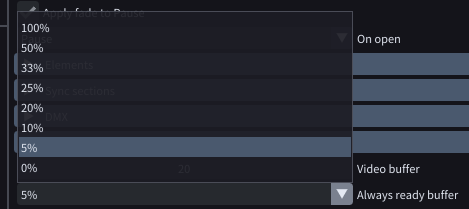
#### LA4-6862: Always Ready Buffer Should Be Possible To Set To 0 Or 5%
The Always ready buffer dropdown includes new 0%, 5%, and 10% options, giving teams finer control for large linear projects and enabling zero-buffer configurations when needed.
**Status:** *Done* | **Requesters:** *JKE*
#### LA4-6710: Frameblending Slowed Down Videos
Added smooth frame blending at low playback speeds. When playback is reduced (e.g., 0.2x) and Frameblending is enabled, LightAct now gradually blends between adjacent frames for more fluid motion.
**Status:** *Done* | **Requesters:** *JLY*
#### LA4-6639: Video Playback Performance Update Times
Added an Update column to the Video playback section in the Performance window, positioned to the right of Status. This column displays the last update time for each Play Video node.
**Status:** *Done*
#### LA4-6432: Video Playback Analysis Tools Improvements
Enhanced diagnostics for video playback:- Play video node now exposes Buffer and Missed integer outputs for clearer monitoring of buffering and dropped frames.- Performance window’s Video playback table adds: - Time column showing the node’s current playback position in HH:MM:SS:FF, with the frame number in parentheses. - Loop column displaying the loop counter.These additions streamline analysis and troubleshooting of playback issues.
**Status:** *Done*
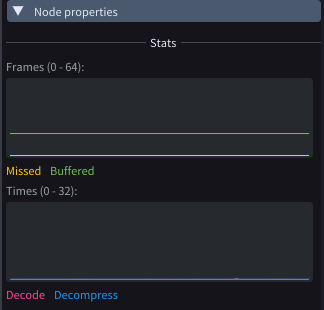
#### LA4-5611: Play Video Node Grafs Gui Update
Redesigned playback graphs in the Play Video node to align with the Performance window for clearer diagnostics. Introduced three views:- Frames: missing (yellow) and buffered (green)- Times: Decode and Decompress in distinct colors- Frame Blending: separate graph due to different unitsImproves consistency and troubleshooting.
**Status:** *Done*
***
## Backup Role Improvements For 4.15
### Improvements
There are 2 new improvements in this epic.
#### LA4-6855: Setup Backup Button
Setting up Automatic failover for Backup machines has been redesigned.
**Status:** *Done*
#### LA4-6448: Role Mark In Automatic Failover Menu
Server roles are now displayed in the Automatic Failover list, matching other views to improve clarity, consistency, and faster identification.
**Status:** *Done*
***
## Qol March 26
March brings smoother, faster, and more reliable experiences across the product. Expect quicker load times, streamlined workflows, and reduced clicks for common tasks. Search is more accurate, notifications are clearer, and keyboard shortcuts are expanded. We’ve refined UI consistency, improved accessibility, and tightened security. Dozens of bugs were fixed to boost stability, with smarter error messages and enhanced admin controls for easier oversight.
### Improvements
There are 4 new improvements in this epic.
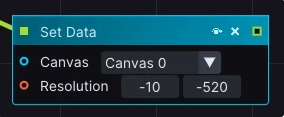
#### LA4-6909: Limit Set Data Node Resolution
Set Data Canvas Resolution node now enforces a minimum of 1×1. Negative or invalid values are blocked to prevent misconfiguration and rendering issues.
**Status:** *Done*
#### LA4-6900: Default Section Crossfade Time
Added “Default section crossfade time” to Project settings alongside “Default layer crossfade time.” Includes a matching float slider and clearly placed “Apply to all existing” buttons for quick bulk updates.
**Status:** *Done*
#### LA4-6863: Home Button Should Move The Playhead To The Beginning Of The Timeline
Pressing the Home key now moves the playhead to the first frame of the selected timeline. This improves navigation speed and consistency, reducing manual scrubbing for precise edits.
**Status:** *Done* | **Requesters:** *SUP*
#### LA4-6740: Timeline Properties
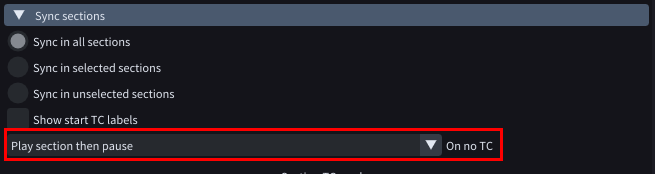
Removed the Behavior category separator. Moved the “On no TC” dropdown beneath the “Show TC labels” checkbox for a clearer layout.
**Status:** *Done*
***
## Node Upgrades For 2026
New and upgraded nodes added in LightAct 4.13.
### Improvements
There are 3 new improvements in this epic.
#### LA4-6922: Set Timeline Data Nodes
Implemented additional nodes for Timeline control. Set Timeline Master Fade, Set Timeline Volume, Set Timeline Speed Multiplier.
**Status:** *Done* | **Requesters:** *HIB, JKE*
#### LA4-6848: Run On Marker Node Rework
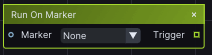
Replaced the dropdown in node properties with an LA Object input, enabling direct marker selection. This streamlines configuration, improves usability, and supports object-based selection over static lists.
**Status:** *Done* | **Requesters:** *JKE*
#### LA4-6813: Get Section Node
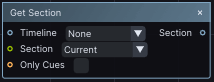
New “Get Section” node added. It allows the user to get a reference to Current, Next or Previous Section and therefore create various read-out and other functionalities.
**Status:** *Done* | **Requesters:** *JKE*
## Other Upgrades
---
# Agent Instructions: Querying This Documentation
If you need additional information that is not directly available in this page, you can query the documentation dynamically by asking a question.
Perform an HTTP GET request on the current page URL with the `ask` query parameter:
```
GET https://docs.lightact.com/release-changelogs/lightact-4.15.b1.md?ask=
```
The question should be specific, self-contained, and written in natural language.
The response will contain a direct answer to the question and relevant excerpts and sources from the documentation.
Use this mechanism when the answer is not explicitly present in the current page, you need clarification or additional context, or you want to retrieve related documentation sections.