> For the complete documentation index, see [llms.txt](https://docs.lightact.com/llms.txt). Markdown versions of documentation pages are available by appending `.md` to page URLs; this page is available as [Markdown](https://docs.lightact.com/release-changelogs/lightact-4.15.1.md).
# LightAct 4.15.1
{% hint style="info" %}
LightAct Changelogs are written by humans and artifical intelligence. Read more about how Changelogs are created [here](https://docs.lightact.com/release-changelogs/how-are-changelogs-generated).
{% endhint %}
This changelog was created on **15 June 2026**. It includes **1 Epics** and **12 upgrades**.
***
## Video Playback Improvements For 4.15
Smoother and more efficient video playback performance.
### Improvements
There are 6 new improvements in this epic.
#### LA4-6977: Every Other Frame Is Skipped When Using Arrow Keys
Improved frame by frame scrolling of video frames when using arrow keys.
**Status:** *Done*
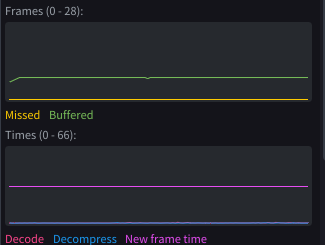
#### LA4-6975: New Frame Time Graph
Added a New frame graph in the Play Video node. It gives you an overview of the smoothness of the playback.
**Status:** *Done*
#### LA4-6974: Missed Frame At Loop If Layer Isn't The Lenght Of Video
Fixed an issue when LightAct missed a frame when looping videos.
**Status:** *Done*
#### LA4-6967: Play Video Node Graphs Ui Rearrangement
Play video node performance graphs were updated.
**Status:** *Done*
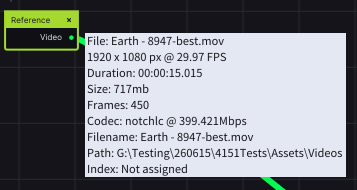
#### LA4-6965: More Information In The Asset Watch
Asset reference watches now show more information about the asset.
**Status:** *Done*
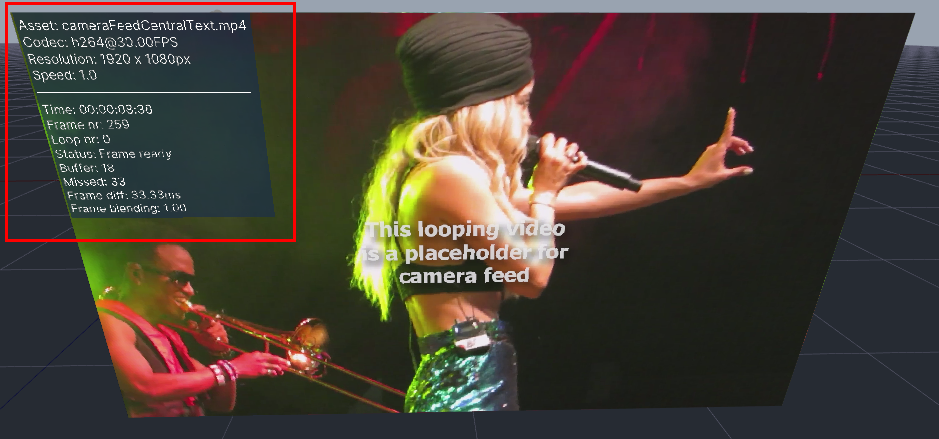
#### LA4-6963: Render Stats Of Play Video Node
Play video node now allows you to render an overlay on top of it allowing you to see the most important playback stats on the outputs. You can enable this in the properties of the node.
**Status:** *Done*
### Fixes
There are 1 new fixes in this epic.
#### LA4-6991: Video Playback Missed Frames
Fixed an issue in 4.15.0 release, which, in some cases, caused missed frames in video playback of 60fps files .
**Status:** *Done*
## Other Upgrades
There are 5 new upgrades in this epic.
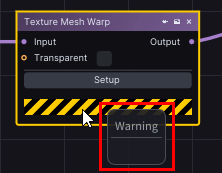
#### LA4-6980: No Render Mesh Warning
Fixed missing warning tooltip when Render mesh is checked.
**Status:** *Done*
#### LA4-6979: Notch Template Duplicates Some Variables On Asset Change
Notch template duplicated some Layer variables on asset change. This is now fixed.
**Status:** *Done*
#### LA4-6978: Copy And Paste Creates Multiple Subareas
Fixed an issue when you copy and pasted a subarea in Output Maps or Canvas Maps windows and the destination subareas were erroneously copied multiple times.
**Status:** *Done*
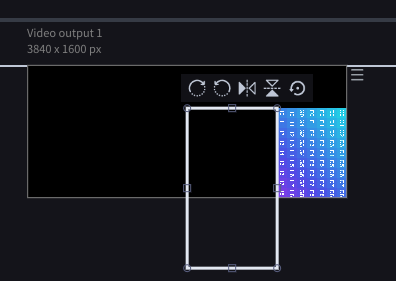
#### LA4-6971: Incorrect Rotating Of Subarea
Resolved an issue where rotating a subarea rotated it in an incorrect way.
**Status:** *Done*
#### LA4-6970: Auto Rename Doesn't Work On Copied Layer
Fixed a naming sync issue for duplicated video layers. After copying a video layer (Ctrl+C/Ctrl+V) and switching its Video variable to a different asset, the layer name updated in Nodes and Properties but not on the Timeline. The Timeline label now updates correctly to match the selected video.
**Status:** *Done*
---
# Agent Instructions
This documentation is published with GitBook. GitBook is the documentation platform designed so that both humans and AI agents can read, navigate, and reason over technical content effectively. Learn more at gitbook.com.
## Querying This Documentation
If you need additional information that is not directly available in this page, you can query the documentation dynamically by asking a question.
Perform an HTTP GET request on the current page URL with the `ask` query parameter:
```
GET https://docs.lightact.com/release-changelogs/lightact-4.15.1.md?ask=
```
The question should be specific, self-contained, and written in natural language.
The response will contain a direct answer to the question and relevant excerpts and sources from the documentation.
Use this mechanism when the answer is not explicitly present in the current page, you need clarification or additional context, or you want to retrieve related documentation sections.