> For the complete documentation index, see [llms.txt](https://docs.lightact.com/llms.txt). Markdown versions of documentation pages are available by appending `.md` to page URLs; this page is available as [Markdown](https://docs.lightact.com/layers-and-layouts/layer-layouts/nodes/computer-vision/optical-flow.md).
# Optical Flow
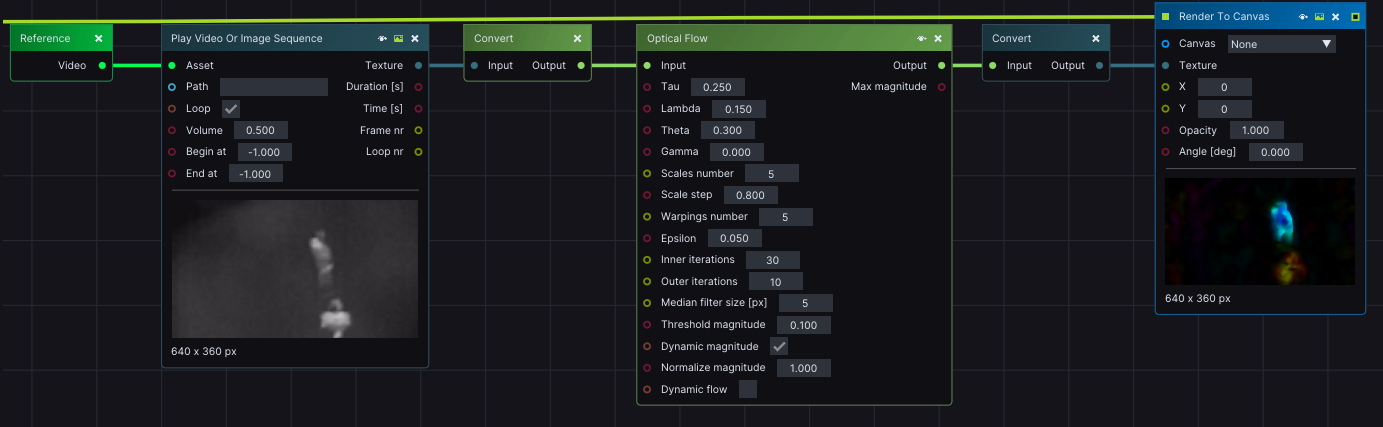
**Optical Flow** node analyzes the movement of pixels from frame to frame and detects moving parts based on the current and previous frames. This node requires CV Mat input and produces a CV Mat output.
**Optical Flow** node analyzes a CV image to identify moving pixels. It compares the current and previous input images to determine these moving parts. The resulting information is stored in the CV output as HSV values. The H channel represents the direction or displacement of the detected movement, while the V channel represents the velocity of the moving part.
## Input pins
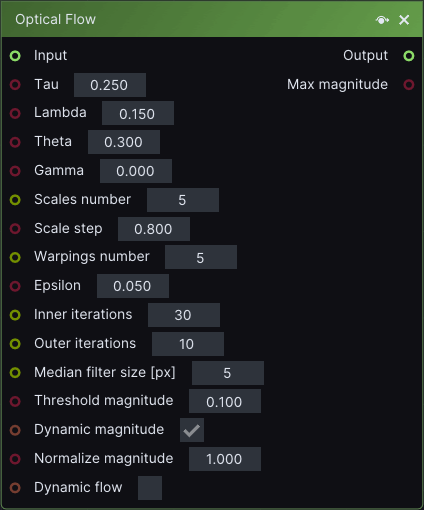
* **CV input:** input image on which moving parts will be detected.
* **Scales number:** the amount of detail in the moving area. A higher *Scale numbers* value translates into a more detailed Output image.
{% hint style="info" %}
**Good to know:** If computation is slow, you can try lowering *Scales number* value.
{% endhint %}
* **Scales step:** expressed as a ratio. If the object is small and moving fast through the images *Scales number* and *Scales step* parameters can be reduced.
* **Median filter size:** higher number results in more "blurry" rectangular-shaped detected moving areas. If the object is moving fast through the image, the *Median filter size* parameter can be set to a higher number than the default.
* **Threshold magnitude:** if the maximum detected magnitude, or velocity, in the whole image is below this value then the output image will be black.
* **Dynamic magnitude:** If disabled then the magnitude for each pixel will be divided by *Normalize magnitude* parameter and stored in V channel. If this checkbox is Enabled, then the maximum magnitude will be set to 255 and the minimum magnitude will be set to 0 in V channel. All values in between will be linearly interpolated.
* **Dynamic Flow:** If this checkbox is disabled, then only the current and previous images from the incoming video stream will be used in detection. If enabled, however, the optical flow algorithm will also use results from the previous detection.
## Output pins
* **Output: d**etected parts of input images in HSV where H is moving direction and V is moving velocity.
* **Max magnitude:** maximum magnitude, or velocity, of all detected parts in the *Output* image.\
This value is not normalized as is the *V channel* in the *Output* image.