> For the complete documentation index, see [llms.txt](https://docs.lightact.com/llms.txt). Markdown versions of documentation pages are available by appending `.md` to page URLs; this page is available as [Markdown](https://docs.lightact.com/layers-and-layouts/layer-layouts/nodes/computer-vision/find-blobs.md).
# Find Blobs
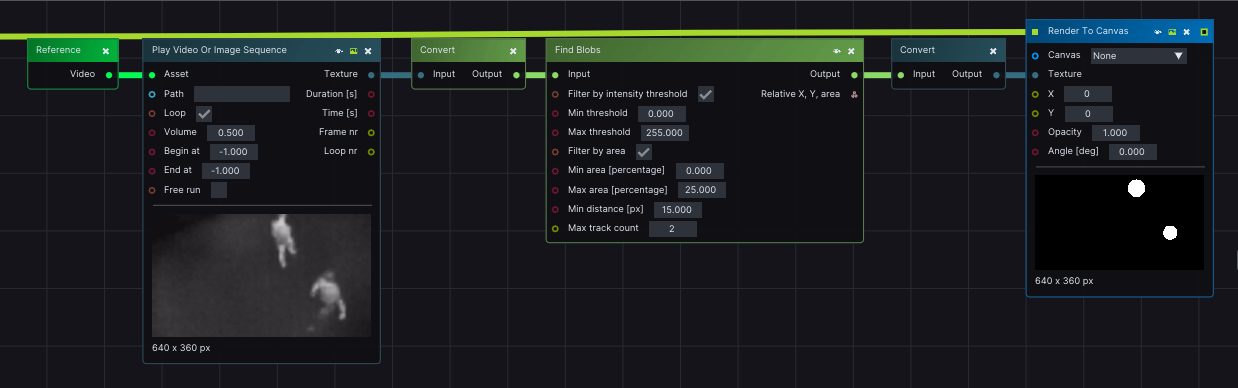
*Find Blobs* is useful in finding all groups of connected pixels, or blobs, in an Image. This node expects a *CV* input.
## Input pins
* **Input:** incoming CV Mat with 1, 3, or 4 channels,
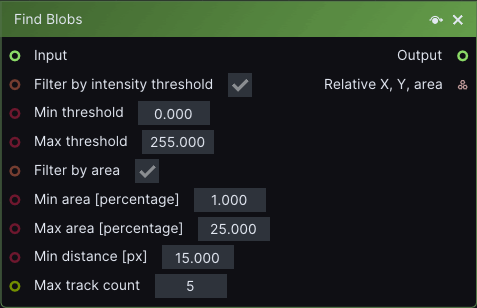
* **Filter by threshold:** enforces a Threshold value on the input which is between the *Min threshold* and *Max threshold* values.
* **Filter by area:** filters the Output, so that the detected blobs are between the *Min area* and *Max area*.
* **Min distance:** the minimum distance between Blobs. If the distance between two blobs is smaller than the chosen value, then those two separate blobs will be combined into one.
* **Max track count:** maximum amount of Blobs in Output.
## Output pins
* **Relative X, Y, area:** relative coordinates of the blobs formatted as such: x position/image width, y position/image height, area = area of blob/area image.