> For the complete documentation index, see [llms.txt](https://docs.lightact.com/llms.txt). Markdown versions of documentation pages are available by appending `.md` to page URLs; this page is available as [Markdown](https://docs.lightact.com/integrations/camera-and-object-tracking/node-based-tracking-workflows.md).
# Node-based Tracking Workflows
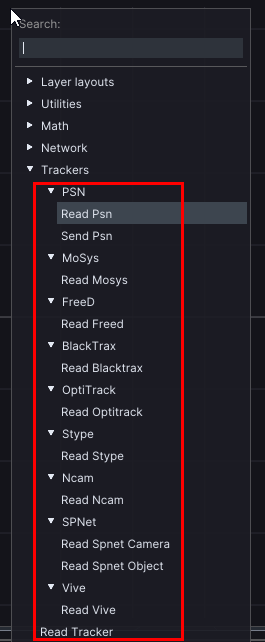
In order to use the values we received through the **Tracking receiver** devices in the *Devices* window, we need to create a **Read** node in one of the layers. So open a layout of one of the layers (by double clicking on it), right-click on a *Layer* window and choose a specific *Layer* reader node.
Every tracking technology is a bit different and the data they provide differs too. However, all of them provide at least *Position and Orientation*.
Therefore, you can always use **Read Tracker** node which works with all tracking technologies.
## Nodes for specific tracking technologies
As most tracking technologies include specific type of format of data, each of these technologies usually have a corresponding layout node that works only with that technology.
In the subsequent pages we will go through some of them.